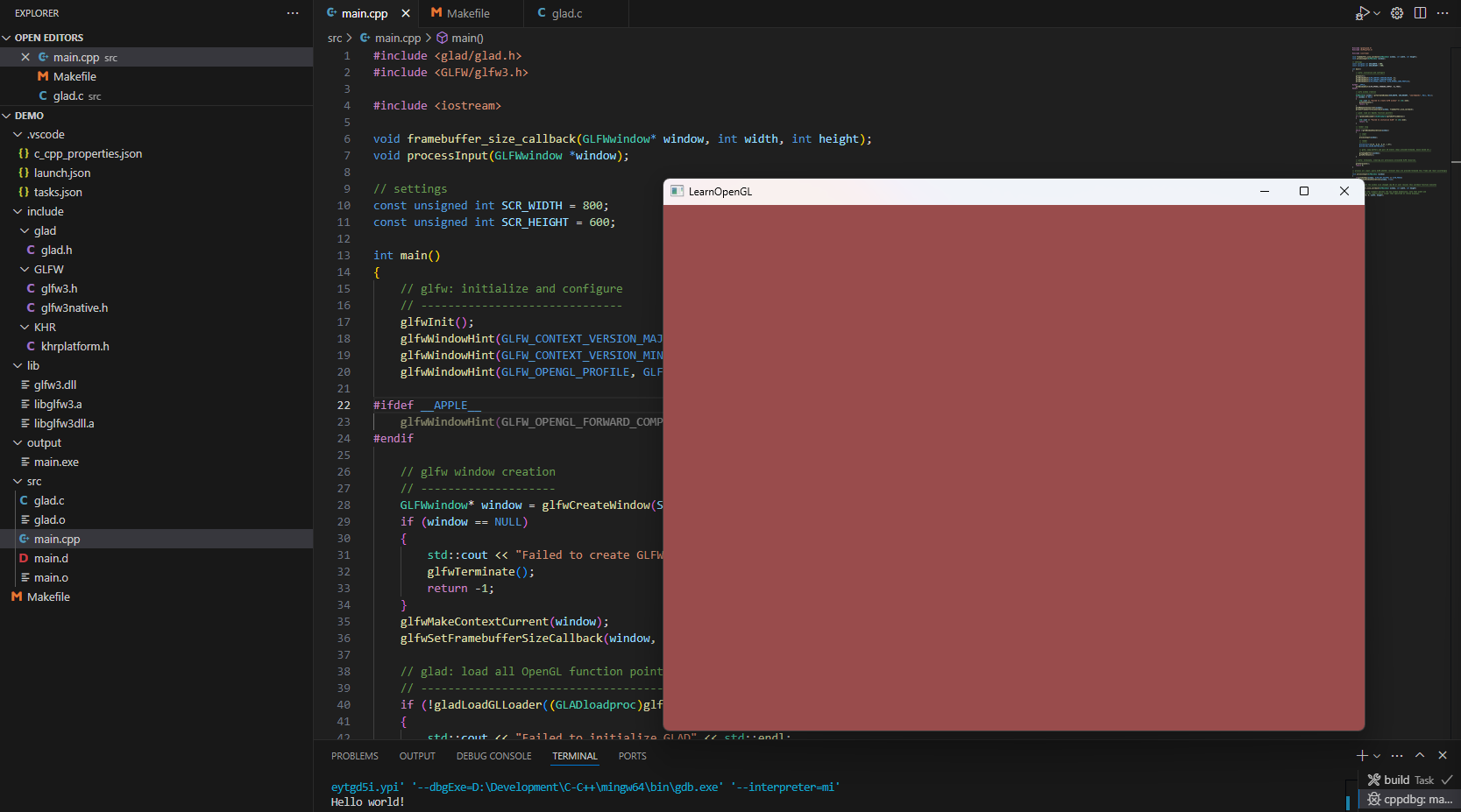
在见过各类使用OpenGL制作的看起来很酷的效果后,愈发的萌生了想要学习的想法。

本系列基于LearnOpenGL-CN教程,记录整体的学习过程与遇到的各类问题。

环境配置

虽然教程里使用的是Visual Studio来搭建OpenGL环境,但是我实在是不想用这么重量级的应用,因为我的目标是学习OpenGL,因此选用了Visual Studio Code来作为开发环境。

配置C/C++环境

由于之前很少写过C/C++,所有理所当然的环境也要从0开始搭建。还在大学还残留了一丝记忆,还记得MingGW,CMake这些。

下载配置MingGW环境

MingGw
安装好后配置相应的环境变量,可以使用以下命名检查配置是否成功

1
gcc -v

配置GLFW和GLAD

GLFW就直接使用预编译好的就行: GLFW下载
GLAD需要配置对应的版本来生成头文件和实现:GLAD
这部分可以完全参照LearnOpenGL文档里的教程:

打开GLAD的在线服务,将语言(Language)设置为C/C++,在API选项中,选择3.3以上的OpenGL(gl)版本(我们的教程中将使用3.3版本,但更新的版本也能用)。之后将模式(Profile)设置为Core,并且保证选中了生成加载器(Generate a loader)选项。现在可以先(暂时)忽略扩展(Extensions)中的内容。都选择完之后,点击生成(Generate)按钮来生成库文件。

搭建OpenGL C/C++项目

我推荐将上述下载的内容都整和到同一个文件夹下,比如

  • LearnOpenGL
    • glfw-3.4.bin.WIN64 (GLFW依赖)
    • mingw64
    • Projects (项目文件夹)

配置C/C++项目

现在开始着手VS Code的配置,首先安装以下扩展:

然后我们可以新建个项目,按下Ctrl + Shift + P运行Create C++ Projects来快速构建CMake项目。
整体项目结构如下:
项目结构
我们可以直接运行检查是否输出Hello world!来确认项目是否构建成功

添加GLFW,GLAD依赖

  1. glfw-3.4.bin.WIN64里的include/GLFW复制到项目的include目录下,lib-mingw-w64同样的移到项目的lib目录下

    当然,你也可以手动配置include/lib路径到glfw来避免复制文件

  2. 将GLAD生成的zip里的include和src整体复制到项目中,目录都是对应的。

由于默认是C++项目,所有我们还需要调整Makefile文件来识别.c文件。

1
2
3
4
5
6
7
8
# define the C source files
SOURCES := $(wildcard $(patsubst %,%/*.cpp, $(SOURCEDIRS))) $(wildcard $(patsubst %,%/*.c, $(SOURCEDIRS)))

# define the C object files
OBJECTS := $(patsubst %.cpp,%.o,$(patsubst %.c,%.o,$(SOURCES)))

.c.o:
$(CXX) $(INCLUDES) -c -MMD $< -o $@

最后Makefile文件如下:

1
2
3
4
5
6
7
8
9
10
11
12
13
14
15
16
17
18
19
20
21
22
23
24
25
26
27
28
29
30
31
32
33
34
35
36
37
38
39
40
41
42
43
44
45
46
47
48
49
50
51
52
53
54
55
56
57
58
59
60
61
62
63
64
65
66
67
68
69
70
71
72
73
74
75
76
77
78
79
80
81
82
83
84
85
86
87
88
89
90
91
92
93
94
95
96
97
98
99
100
101
102
#
# 'make' build executable file 'main'
# 'make clean' removes all .o and executable files
#

# define the Cpp compiler to use
CXX = g++

# define any compile-time flags
CXXFLAGS := -std=c++17 -Wall -Wextra -g

# define library paths in addition to /usr/lib
# if I wanted to include libraries not in /usr/lib I'd specify
# their path using -Lpath, something like:
LFLAGS := -lglfw3 -lopengl32 -lgdi32

# define output directory
OUTPUT := output

# define source directory
SRC := src

# define include directory
INCLUDE := include

# define lib directory
LIB := lib

ifeq ($(OS),Windows_NT)
MAIN := main.exe
SOURCEDIRS := $(SRC)
INCLUDEDIRS := $(INCLUDE)
LIBDIRS := $(LIB)
FIXPATH = $(subst /,\,$1)
RM := del /q /f
MD := mkdir
else
MAIN := main
SOURCEDIRS := $(shell find $(SRC) -type d)
INCLUDEDIRS := $(shell find $(INCLUDE) -type d)
LIBDIRS := $(shell find $(LIB) -type d)
FIXPATH = $1
RM = rm -f
MD := mkdir -p
endif

# define any directories containing header files other than /usr/include
INCLUDES := $(patsubst %,-I%, $(INCLUDEDIRS:%/=%))

# define the C libs
LIBS := $(patsubst %,-L%, $(LIBDIRS:%/=%))

# define the C source files
SOURCES := $(wildcard $(patsubst %,%/*.cpp, $(SOURCEDIRS))) $(wildcard $(patsubst %,%/*.c, $(SOURCEDIRS)))

# define the C object files
OBJECTS := $(patsubst %.cpp,%.o,$(patsubst %.c,%.o,$(SOURCES)))

# define the dependency output files
DEPS := $(OBJECTS:.o=.d)

#
# The following part of the makefile is generic; it can be used to
# build any executable just by changing the definitions above and by
# deleting dependencies appended to the file from 'make depend'
#

OUTPUTMAIN := $(call FIXPATH,$(OUTPUT)/$(MAIN))

all: $(OUTPUT) $(MAIN)
@echo Executing 'all' complete!

$(OUTPUT):
$(MD) $(OUTPUT)

$(MAIN): $(OBJECTS)
$(CXX) $(CXXFLAGS) $(INCLUDES) -o $(OUTPUTMAIN) $(OBJECTS) $(LFLAGS) $(LIBS)

# include all .d files
-include $(DEPS)

# this is a suffix replacement rule for building .o's and .d's from .c's
# it uses automatic variables $<: the name of the prerequisite of
# the rule(a .c file) and $@: the name of the target of the rule (a .o file)
# -MMD generates dependency output files same name as the .o file
# (see the gnu make manual section about automatic variables)
.cpp.o:
$(CXX) $(CXXFLAGS) $(INCLUDES) -c -MMD $< -o $@
.c.o:
$(CXX) $(INCLUDES) -c -MMD $< -o $@

.PHONY: clean
clean:
$(RM) $(OUTPUTMAIN)
$(RM) $(call FIXPATH,$(OBJECTS))
$(RM) $(call FIXPATH,$(DEPS))
@echo Cleanup complete!

run: all
./$(OUTPUTMAIN)
@echo Executing 'run: all' complete!

现在我们可以测试以下,将main.cpp文件修改为OpenGL示例代码:

1
2
3
4
5
6
7
8
9
10
11
12
13
14
15
16
17
18
19
20
21
22
23
24
25
26
27
28
29
30
31
32
33
34
35
36
37
38
39
40
41
42
43
44
45
46
47
48
49
50
51
52
53
54
55
56
57
58
59
60
61
62
63
64
65
66
67
68
69
70
71
72
73
74
75
76
77
78
79
80
81
82
83
84
85
86
#include <glad/glad.h>
#include <GLFW/glfw3.h>

#include <iostream>

void framebuffer_size_callback(GLFWwindow* window, int width, int height);
void processInput(GLFWwindow *window);

// settings
const unsigned int SCR_WIDTH = 800;
const unsigned int SCR_HEIGHT = 600;

int main()
{
// glfw: initialize and configure
// ------------------------------
glfwInit();
glfwWindowHint(GLFW_CONTEXT_VERSION_MAJOR, 3);
glfwWindowHint(GLFW_CONTEXT_VERSION_MINOR, 3);
glfwWindowHint(GLFW_OPENGL_PROFILE, GLFW_OPENGL_CORE_PROFILE);

#ifdef __APPLE__
glfwWindowHint(GLFW_OPENGL_FORWARD_COMPAT, GL_TRUE);
#endif

// glfw window creation
// --------------------
GLFWwindow* window = glfwCreateWindow(SCR_WIDTH, SCR_HEIGHT, "LearnOpenGL", NULL, NULL);
if (window == NULL)
{
std::cout << "Failed to create GLFW window" << std::endl;
glfwTerminate();
return -1;
}
glfwMakeContextCurrent(window);
glfwSetFramebufferSizeCallback(window, framebuffer_size_callback);

// glad: load all OpenGL function pointers
// ---------------------------------------
if (!gladLoadGLLoader((GLADloadproc)glfwGetProcAddress))
{
std::cout << "Failed to initialize GLAD" << std::endl;
return -1;
}

// render loop
// -----------
while (!glfwWindowShouldClose(window))
{
// input
// -----
processInput(window);

// render
// ------
glClearColor(0.6f, 0.3f, 0.3f, 1.0f);
glClear(GL_COLOR_BUFFER_BIT);

// glfw: swap buffers and poll IO events (keys pressed/released, mouse moved etc.)
// -------------------------------------------------------------------------------
glfwSwapBuffers(window);
glfwPollEvents();
}

// glfw: terminate, clearing all previously allocated GLFW resources.
// ------------------------------------------------------------------
glfwTerminate();
return 0;
}

// process all input: query GLFW whether relevant keys are pressed/released this frame and react accordingly
// ---------------------------------------------------------------------------------------------------------
void processInput(GLFWwindow *window)
{
if(glfwGetKey(window, GLFW_KEY_ESCAPE) == GLFW_PRESS)
glfwSetWindowShouldClose(window, true);
}

// glfw: whenever the window size changed (by OS or user resize) this callback function executes
// ---------------------------------------------------------------------------------------------
void framebuffer_size_callback(GLFWwindow* window, int width, int height)
{
// make sure the viewport matches the new window dimensions; note that width and
// height will be significantly larger than specified on retina displays.
glViewport(0, 0, width, height);
}
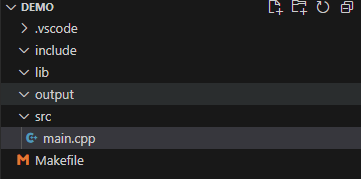
直接运行,应该会展示一个窗口,最终项目结构与示例如下图:
运行

示例源码

以上示例项目源码已同步到Github: LearnOpenGL Github,如果有其他的问题可以尝试直接clone下来。


本站由 Lowae 使用 Stellar 1.29.1 主题创建。
Copyright © 2024-2024 Lowae 保留所有权利。
本博客所有文章除特别声明外,均采用 CC BY-NC-SA 4.0 许可协议,转载请注明出处。
|